Cameras that stay on site

Construction
Site Camera

A camera that stays on your construction site. Open a live view of the site whenever you need to, and download the image files straight away — without waiting for someone to send them, and without driving out to see how far the work has got.

Unlike ordinary CCTV, every frame is kept for the whole project — and when the job is done, those same frames become a time-lapse film of the entire build.

  • Live view, any time

    See the site the moment you want to — no appointment, no waiting for a report.

  • Download straight away

    Pull the files yourself whenever you need them — today's frame or one from months back.

  • A time-lapse at the end

    The frames gathered through the project are cut into a film of the whole build.

The difference

Not ordinary CCTV

Ordinary CCTV is built for watching. A construction project needs more than that: to know how far the work has got, to go back and see when something was finished, and to have images to report with. This is where they differ.

Every frame kept for the whole job

Ordinary CCTV usually records in a loop, deleting the oldest footage when storage fills. If you need to check what was finished four months ago, it may already be gone. We keep every frame as its own file for the whole project — open the date you need and download it.
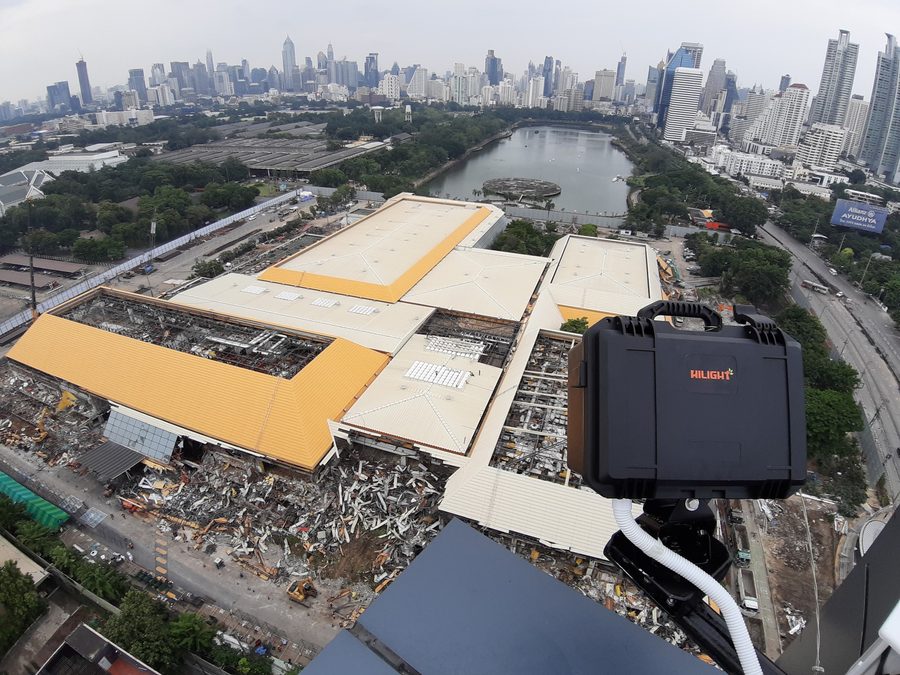
High-resolution stills

We record individual high-resolution stills rather than video compressed to save space, so the images are clear enough for progress reports, for the site meeting, and as evidence when the sequence of work is disputed.

Checked every day

We watch what comes in every day rather than installing a camera and walking away. If something goes wrong we know that day — not when you need the images and find weeks missing.

A time-lapse film at the end

The same frames you look at day to day become, at the end, a film that compresses the whole project into a few minutes — days into months into years, smooth and without flicker. For the opening, for sales, for the shareholders.

The real equipment

Photographs from our own sites

The equipment and the way it is mounted are our own design, in continuous use for more than twenty years.

กล้องไทยสกาย-ดิจิตัลติดตั้งบนดาดฟ้า มองลงไซต์ก่อสร้างขนาดใหญ่ในกรุงเทพฯ

The whole site in view

Mounted on high ground beside the site, so the entire job fits one frame.

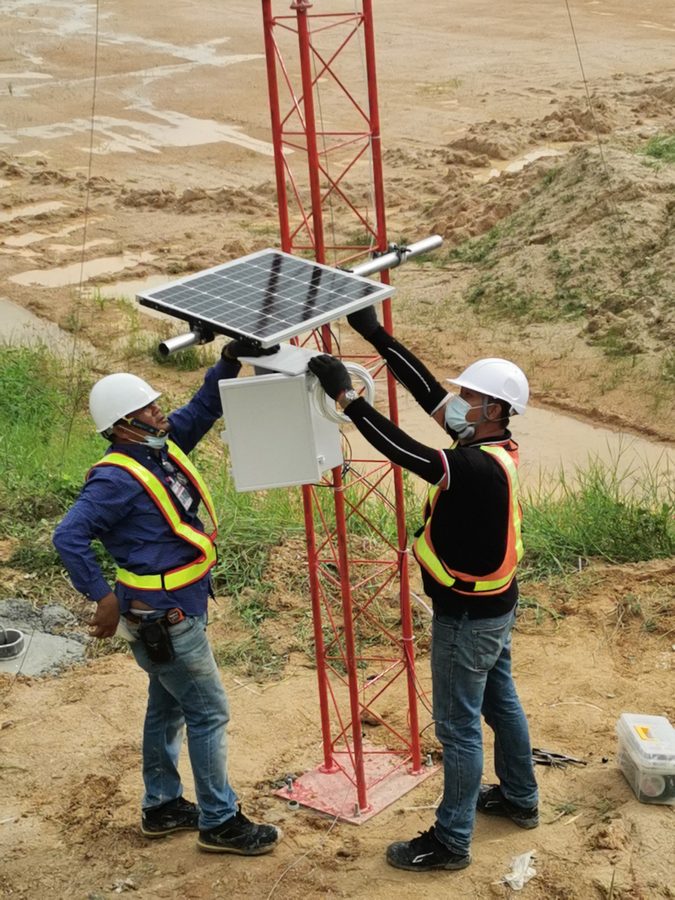
ทีมงานติดตั้งตู้กล้องและแผงโซลาร์เซลล์บนเสาในไซต์งาน

Mounted on site

A weatherproof enclosure on a mast in open ground, with its own solar panel.

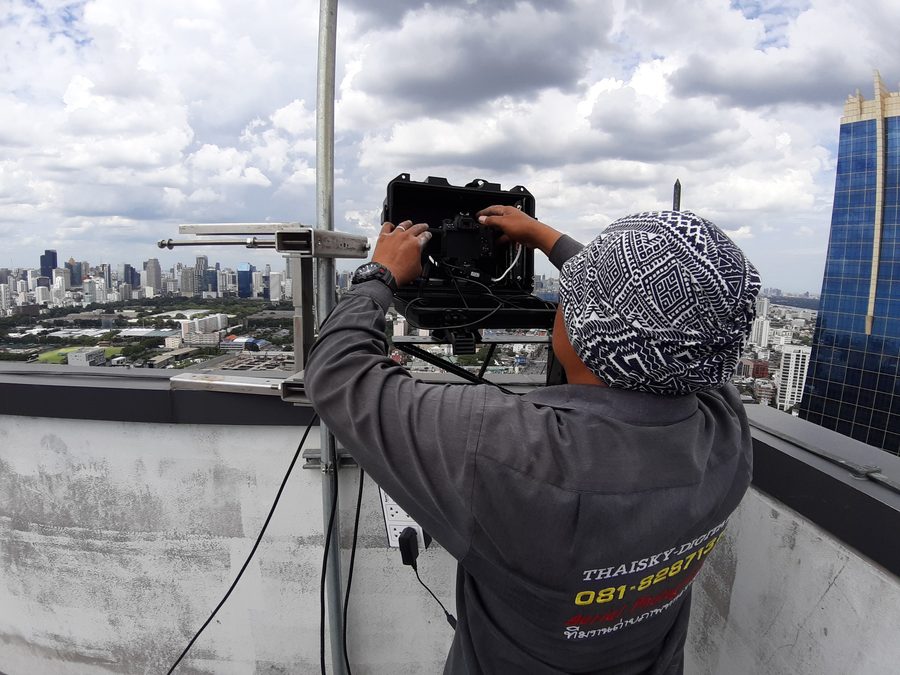
ช่างไทยสกาย-ดิจิตัลปรับตั้งกล้องบนดาดฟ้าอาคารสูง

Our own crew

Installed, maintained and adjusted by the Thaisky-Digital crew for the life of the project.

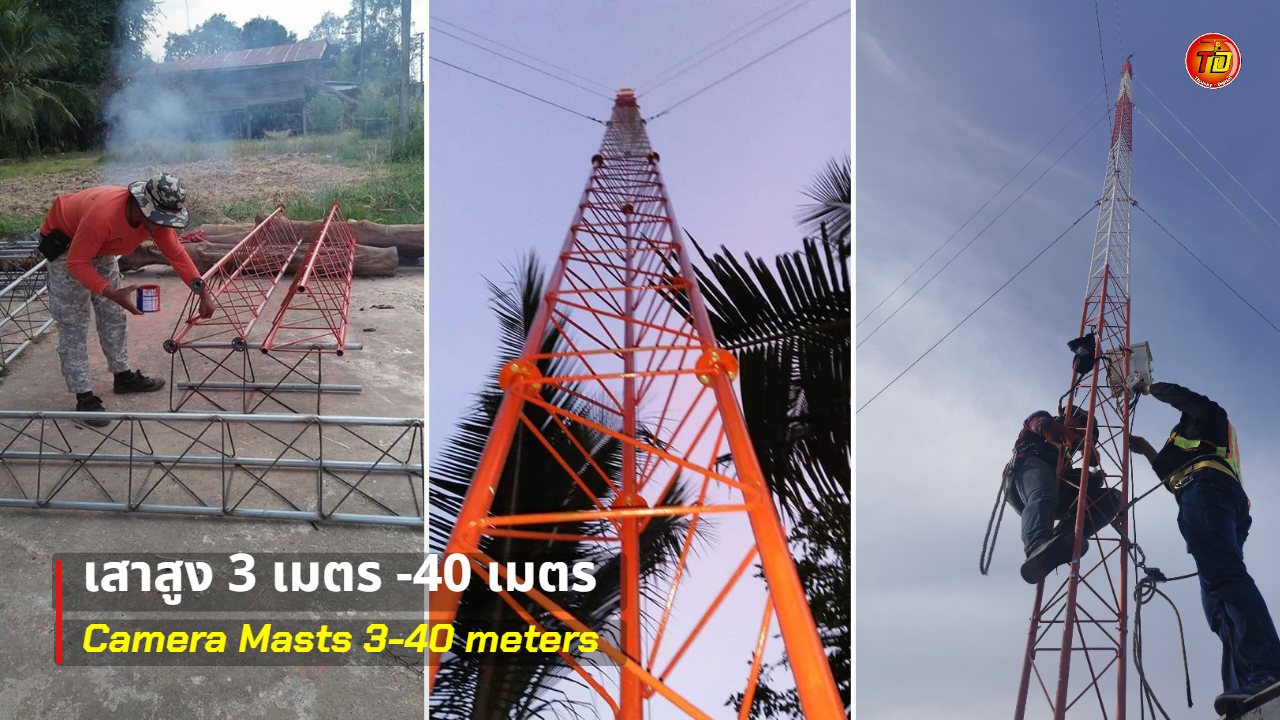
เสาเหล็กติดกล้องสูง 3–40 เมตร ตั้งแต่ประกอบท่อนเสาจนทีมงานปีนติดตั้งกล้องบนยอดเสา

Steel masts, 3–40 metres

Where open ground has nowhere high to mount a camera, our own crew puts up a steel mast, engineer-certified on request.

About camera masts →

No power on site? Still fine

The camera runs from a solar panel installed with it and reports its power status back to the office.

The heart of it

Not the camera spec — the software

Clients often ask which camera we use. The answer is that the camera is only the lens: resolution is chosen to suit the job, from 4K up to a 30–50 megapixel DSLR. What actually decides whether a time-lapse running for months or years succeeds is the software behind it — software that always shows the camera is working, lets settings change without a site visit, and hands the images over straight away. We wrote this application ourselves, for our own work.

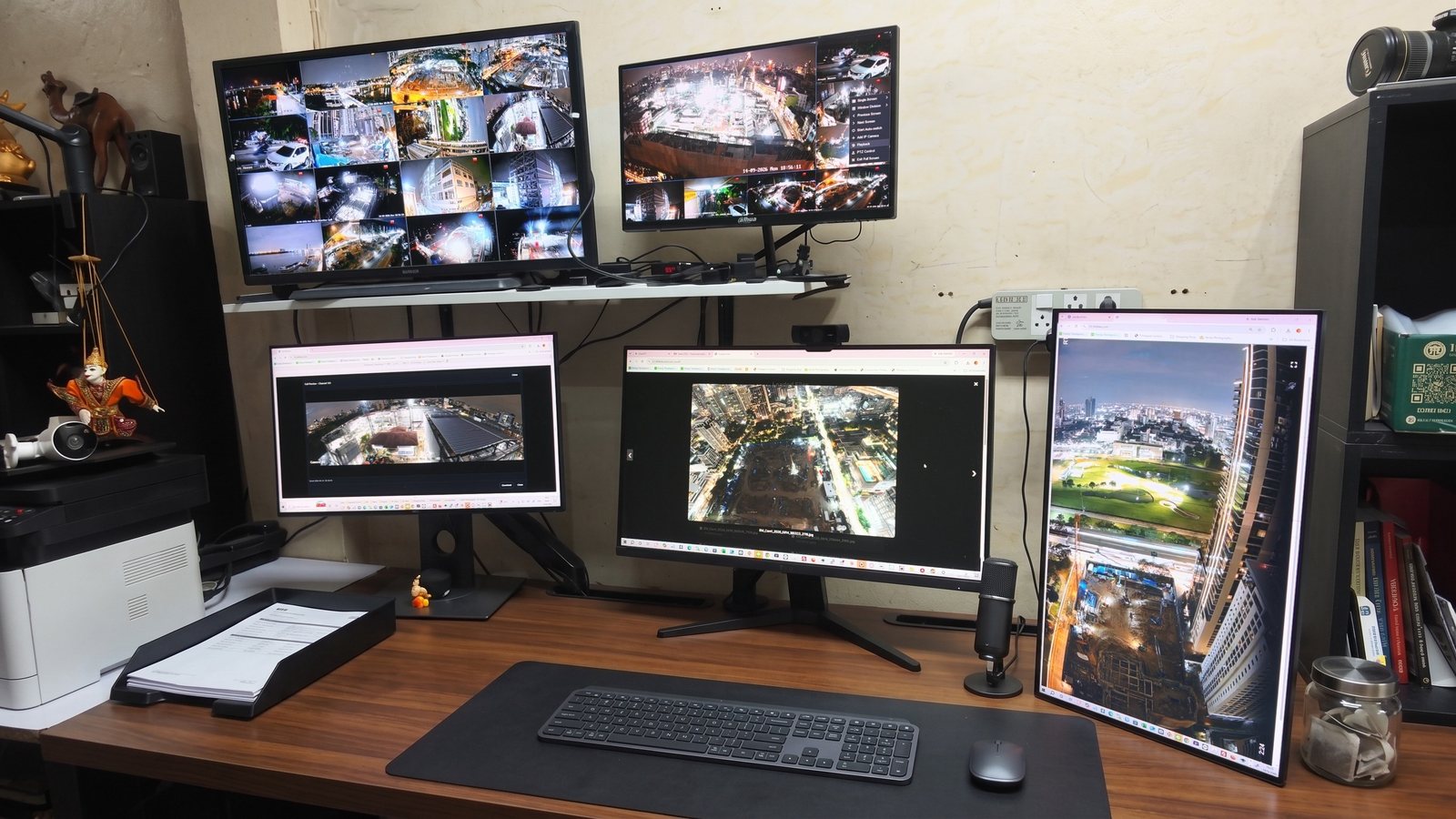
ห้องควบคุมที่ออฟฟิศไทยสกาย-ดิจิตัล จอแสดงภาพสดจากกล้องไซต์ก่อสร้างหลายสิบตัว ถ่ายเวลาหนึ่งทุ่ม
Our office at 7 pm, with live feeds from our cameras on the screens.

Every camera watched from the office

Feeds from every site come up on the screens in our office. The cameras run day and night, so if one stops sending pictures, we see it at once.

The lower-left screen shows a 180-degree wide-angle camera taking in the whole area in one frame. The upright screen on the right shows how, for a tall building at close range, we turn the camera to portrait.

The frames recorded for a client follow whatever hours the job needs — often daylight only — which is why the night views on these screens can show some glare without touching what is delivered.

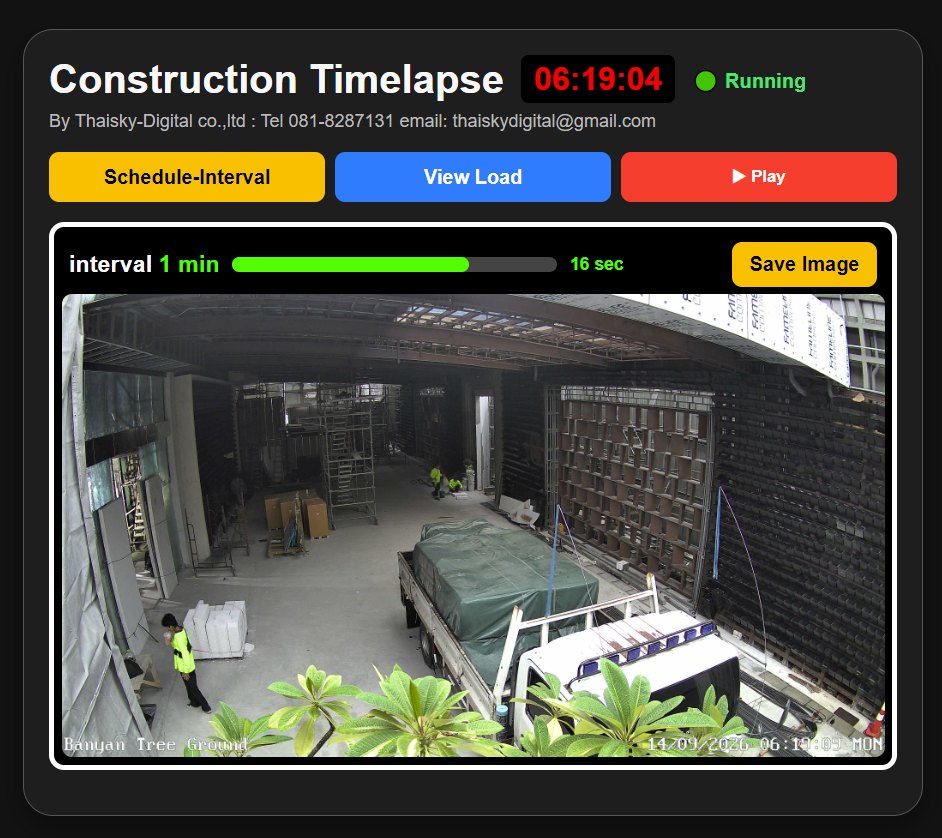
หน้าควบคุมแอป Construction Timelapse แสดงสถานะ Running ภาพสดจากไซต์งาน และเวลาถึงภาพถัดไป

Always know it is working

The control screen shows the camera's status, the latest frame from site, the interval set, and a countdown to the next shot — with a button to save the image on the spot, and a Play button that runs the latest 100 frames as a sample time-lapse, without waiting for the project to end.

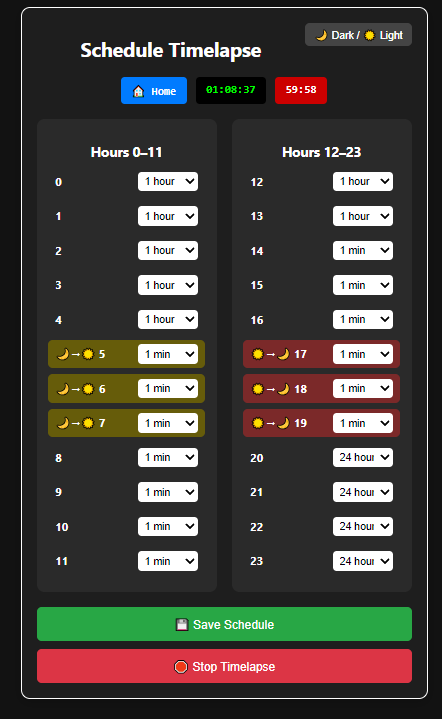
หน้าตั้งเวลา Schedule Timelapse ตั้งความถี่การถ่ายแยกได้ทุกชั่วโมงตลอด 24 ชั่วโมง

An interval for every hour

Each of the 24 hours has its own interval, anywhere from one second to twenty-four hours. Sunrise, 05:00–07:00, and sunset, 17:00–19:00, can run dense to catch the light. Clients can see the settings; only an administrator can change them. When the pace of work on site shifts, or a client wants more frames for a particular stretch, we change it online, with no site visit.

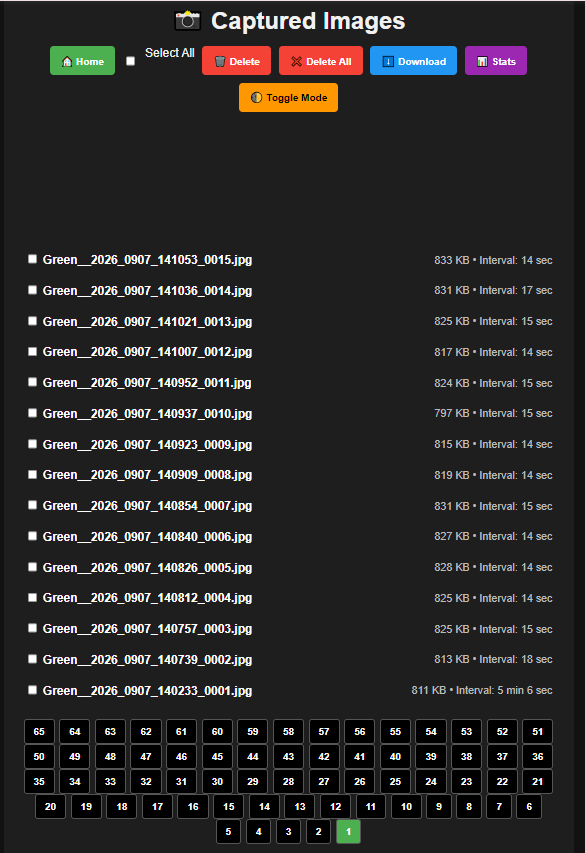
หน้าคลังภาพ Captured Images แสดงรายชื่อไฟล์ ขนาด และระยะห่างระหว่างภาพ พร้อมปุ่มดาวน์โหลด

An archive you can download

Newest frames first, each file named by project, camera, date and time, with its size and the gap since the previous shot. Open any frame full size and download it straight away. Only a password-holding administrator can delete, and only once the frames are safely stored at our office.

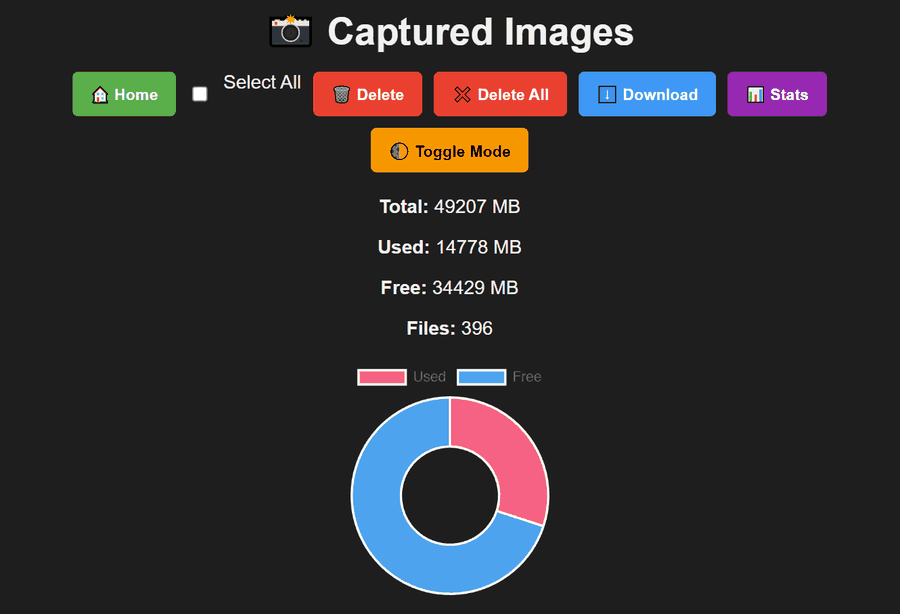
หน้าสถิติพื้นที่จัดเก็บ แสดงพื้นที่ทั้งหมด พื้นที่ที่ใช้ พื้นที่ที่เหลือ จำนวนไฟล์ และกราฟวงกลม

Warned before storage fills

The stats page shows the total space, the space used and left on the camera, and the number of files, with a chart you can read at a glance. When space runs low, the system alerts our office, so we can deal with it well before the day it fills.

See the software at work

Live view, scheduling, the archive and storage stats, in one video — from software we built ourselves.

The best camera in the world is no use if it stops for three months and nobody notices.

Before you decide

Six questions to ask every time-lapse provider

Many time-lapse providers quote similar prices, but the systems behind them differ a great deal — and the difference only shows months into the job. Ask these six before you sign, of everyone, us included.

1. Can we see the site live from the office?

If not, you only learn how the work is going when someone sends you pictures.

Our answer: yes, whenever you like.

2. If we want images mid-month, does someone climb up for a card?

Site cameras are usually mounted high — thirty metres up a steel mast, say. If the images live on an SD card, every request means a climb.

Our answer: no — download from the office, straight away.

3. Still frames, or a video file?

If it records video and the file fails, everything in that file is gone — and a construction site cannot be re-shot.

Our answer: separate still frames; a fault costs one to three of them.

4. Can the interval be changed remotely?

Each phase of a job moves at its own pace. If changing it means going up to the camera, in practice nobody does.

Our answer: yes, hour by hour, from one second to twenty-four hours.

5. If the internet drops or the power runs out, are those images lost?

Site internet drops as a matter of course, and every battery runs down.

Our answer: no. The camera always stores frames itself first and we pull the rest when the connection returns, with an alert the moment it drops. Power is solar with a backup, site mains, or both.

6. If there is no building or high point nearby, where does the camera go?

Many sites are open ground. A provider without masts of its own has to settle for a position that cannot see the whole job.

Our answer: we put up steel masts from 3 to 40 metres with our own crew, with engineer certification available on request.

See our camera masts →

What it is for

Who uses it

Managers away from site

Running several projects at once — open a live view of each site from the office or a phone, and know where the work stands without waiting for the weekly report.

Owners far away

An owner or investor in another province or another country can see the progress of their own building with their own eyes, whenever they like.

A record of sequence

When there is an argument over when a section was finished, or why it ran late, a complete daily record for the whole project is evidence you can open on the spot.

Marketing and the opening

The time-lapse at the end shows buyers how the building came to be — for the launch, the website and social media.

Common questions

Questions about site cameras

Do we need power and internet on site?

Both help. Where a site has neither yet there are ways around it, including solar power on ground that has no supply. This is one of the things the survey is for.

Why not just rent CCTV?

Self-installed CCTV gives you a watching camera, but nobody looks after it for the length of the job, old footage is usually overwritten, and there is no progress film at the end. Ours is a service: the camera is checked daily, every frame is kept, and a time-lapse is delivered when the work is done.

How long can it run?

The longest we have run without a break is five years and seven months, at ONE Bangkok, with the same camera in the same position throughout. The shortest took only a few days.

See every project with its duration →

What does it cost?

We do not publish a price, because it depends on the number of cameras, the length of the project and the site itself. We listen to the requirement, ask to survey the site, and quote against what is really there.

Next step

Arrange a site survey

Tell us where the site is, when work starts and roughly how long it runs. We will arrange to see it, then propose the number of cameras and mounting points that suit it. We work anywhere in Thailand.

Phone

Thanet Duangphattra
081-828-7131

You can reach us on LINE, or call 081-828-7131.